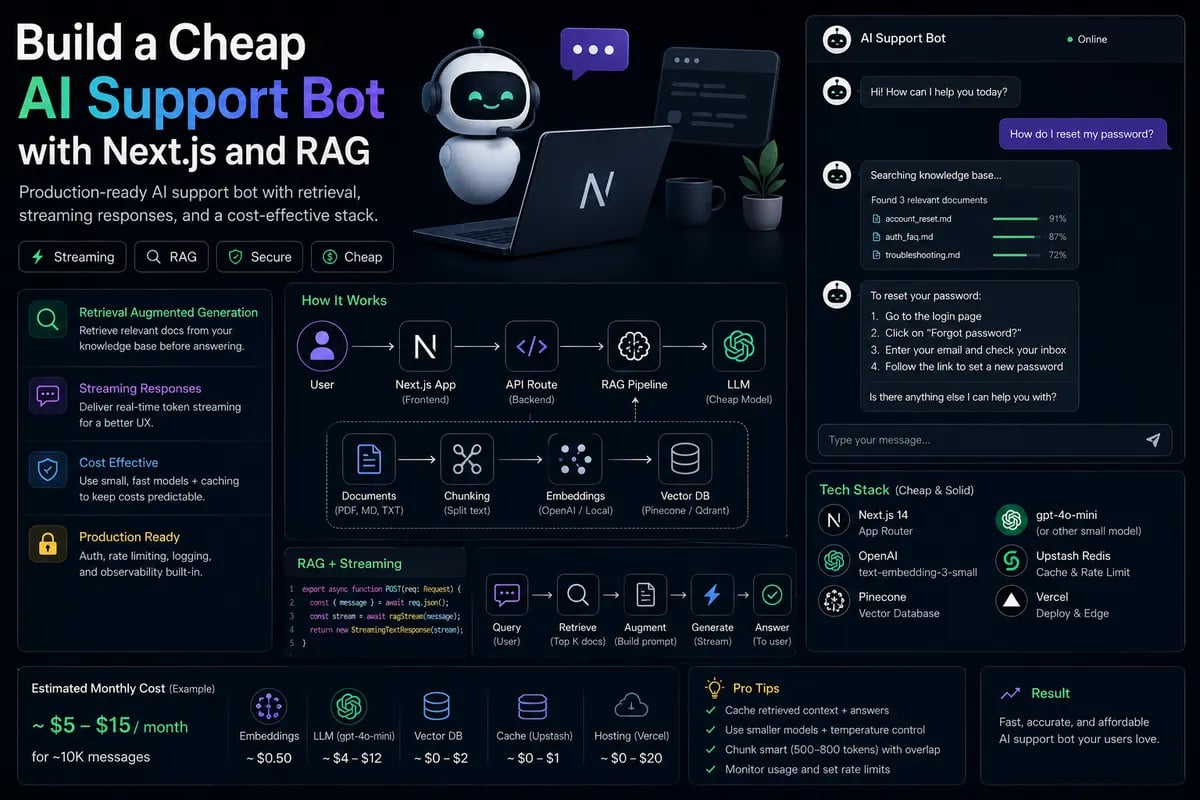
Why this architecture works
If you want to ship a support bot that does not feel like a demo, the stack matters more than the model name. In 2026, the best pattern for many teams is a cheap retriever plus a stronger summarizer only when needed. That keeps latency and token cost under control while still giving users useful answers.
This article focuses on a Next.js-based bot that uses RAG, streaming, and a low-cost model for first-pass answers. It is a pattern I would actually ship for an MVP.
Who this is for
This is for startups, SaaS teams, and indie hackers who want a support assistant for docs, tickets, or onboarding. It also works for internal knowledge bases where the goal is to answer quickly without sending every query to an expensive flagship model.
System design
The cleanest version has five pieces:
- Next.js app for UI and server actions.
- Vector store for retrieval.
- Cheap model for answer drafting.
- Stronger model for escalation.
- Cache for repeated answers.
The first model does not need to be perfect. It just needs to be good enough to answer 80% of repetitive questions.
Flow
text
User question
-> retrieve top chunks
-> build short context
-> draft answer with cheap model
-> if confidence is low, escalate
-> cache final output
Implementation sketch
ts
import { streamText } from 'ai'
import { openai } from '@ai-sdk/openai'
export async function POST(req: Request) {
const { messages } = await req.json()
return streamText({
model: openai('gpt-5-mini'),
messages,
system: 'Answer only from the provided company docs.'
}).toDataStreamResponse()
}
That is the pleasant part. The real work is retrieval quality.
ts
function buildPrompt(question: string, chunks: string[]) {
return
Answer using only these sources:\n${chunks.join('\n---\n')}\n\nQuestion: ${question}
}
If the retrieved chunks are bad, the bot will hallucinate with confidence. That is where most teams lose time.
Free vs paid model split
For this type of bot, I prefer a cheap model for the first answer and a paid fallback only when the query is ambiguous or high risk. This is where model routing becomes more useful than model comparison.
| Layer | Suggested choice | Why |
|---|
| Retrieval | Fast local or hosted vector DB | Cheap and predictable |
| Draft answer | Small/cheap model | Handles common questions well |
| Escalation | Stronger model | Better for edge cases |
| Cache | Redis or KV store | Reduces repeat token spend |
Cost and latency
A support bot usually gets hammered with repeated questions. That is good news. It means caching matters a lot. If 30% of traffic is repeated phrasing, response caching can cut model spend by a noticeable margin.
Typical production pain points:
- Long context windows that inflate cost.
- Slow retrieval due to poor chunking.
- Chatty answers that waste output tokens.
- No cache keys for repeated questions.
I’d keep the answer format short by default. Users asking support questions usually want the fix, not a lecture.
Gotchas
RAG breaks when chunking is sloppy. If you split docs too aggressively, the model misses the answer. If you make chunks too large, retrieval gets noisy and token spend goes up. The sweet spot depends on your docs, but a lot of teams do well with chunks around a few hundred tokens, then tune from there.
Another failure mode is treating every user message as if it needs a live model call. Some requests should just return a cached article, a search result, or a canned reply.
Recommendation matrix
Use this approach when:
- Your docs change often.
- Support questions repeat.
- You need a fast MVP with controlled spend.
Avoid it when:
- You need perfect source attribution.
- The knowledge base is tiny.
- The answers must be legally exact.
Practical conclusion
The best cheap support bot is not the one with the fanciest model. It is the one that retrieves well, streams fast, and only escalates when needed. That combination usually gives you the best balance of user experience and cost.
Start with a small model, add caching early, and only spend premium tokens on the hard cases.