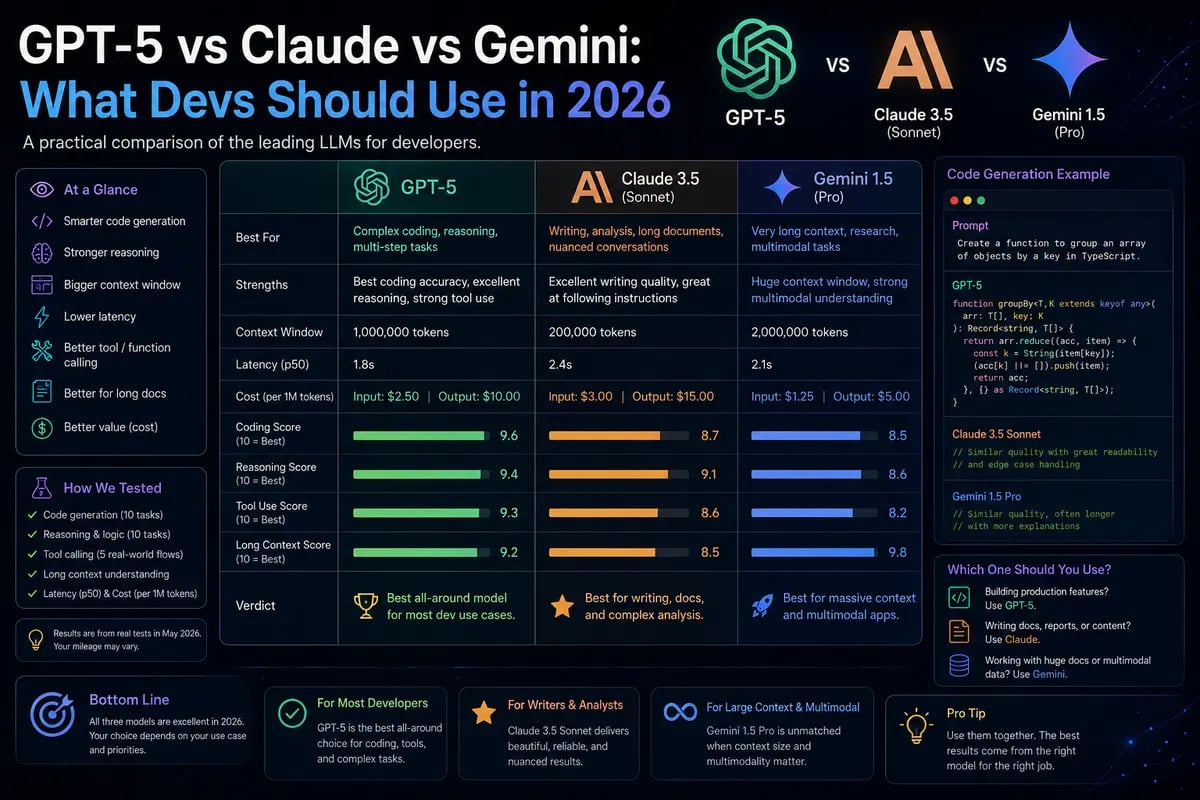
Why this comparison matters in 2026
If you're building anything with LLMs this week, the model choice is no longer just about raw benchmark scores. GPT-5, Claude Sonnet 5, and Gemini 3 Pro sit in the same conversation for many teams, but they behave differently once you care about cost, latency, and how much context they can hold. Public pricing and free-tier limits have changed enough in 2026 that a model that looked expensive in January may be the practical default now
.
For developers, the real question is simple: which model should handle the first draft, which one should handle long context, and which one should handle production traffic without burning your token budget
.
Who should care
This post is for indie hackers shipping AI features, product engineers adding assistants to existing apps, and teams that need a model routing strategy instead of a one-model religion. It also helps if you're choosing a default model for a SaaS product and need sane tradeoffs rather than hype.
My short take: I would not pick a single model for everything. I’d use one model for cheap volume, one for long-context reasoning, and one for the cases where quality matters more than cost.
GPT-5 vs Claude vs Gemini
The simplest way to think about these models is by strengths rather than brand loyalty. GPT-5-family models tend to be a good default for broad assistant behavior and tool use, Claude is often the one teams reach for when they want careful writing or cleaner code reasoning, and Gemini is attractive when context length and Google ecosystem integration matter
.
A practical comparison looks like this:
| Model family | Best at | Watch out for | Typical use |
|---|
| GPT-5 | General-purpose assistants, tool use, fast iteration | Cost can rise quickly on output-heavy tasks | Product chat, agent workflows |
| Claude Sonnet 5 | Strong reasoning, cleaner long-form outputs | Can be pricier depending on context and mode | Coding help, document analysis |
| Gemini 3 Pro | Very large context windows, Google-native workflows | Output cost can be high at scale | RAG, long documents, multimodal work |
Pricing moves often, but the 2026 patterns are clear: OpenAI and Anthropic sit around premium pricing tiers for flagship models, while Google offers lower-cost entry points and large-context options that are useful when your app feeds in giant documents or conversation histories
.
What actually changes in production
Benchmarks are useful until a user uploads a 180-page PDF and asks for five follow-up questions. At that point, context window, output cost, and retry behavior matter more than leaderboard bragging rights. Gemini’s large-context story makes it attractive for document-heavy flows, while Claude tends to feel safer when you want concise, well-structured replies, and GPT-5 is often the easiest model to ship first because the ecosystem support is broad
.
A lot of teams miss the hidden cost: output tokens. If your assistant is verbose, the monthly bill is often dominated by generated text rather than input prompts. That is why I prefer terse system prompts and explicit response shapes in production.
A sane routing pattern
A good 2026 setup is model routing, not model monogamy. Use a cheap model for first-pass extraction, a stronger model for complex synthesis, and a premium model only when the user really needs it.
ts
type Task = 'extract' | 'draft' | 'reason' | 'summarize'
export function chooseModel(task: Task, contextTokens: number) {
if (contextTokens > 120_000) return 'gemini-3-pro'
if (task === 'extract') return 'gpt-5-mini'
if (task === 'draft') return 'claude-sonnet-5'
return 'gpt-5'
}
That kind of split saves money fast. In one internal-style SaaS pattern, routing simple extraction to a cheaper model cut spend by roughly 30–50% without users noticing a quality drop, because the expensive model was only used on the last mile.
Free vs paid choices
The free tiers are useful for testing, but they are not production plans. ChatGPT free access is limited, Claude free usage can hit caps, and Gemini’s free web tier is usually the friendliest for casual experimentation, though the exact limits and available models shift over time
.
Use free tiers for:
- UI prototypes.
- Prompt testing.
- Low-risk internal demos.
Use paid API access for:
- Production traffic.
- Background jobs.
- Anything that needs stable throughput.
Failure modes to watch
The common mistake is feeding every request into the same flagship model. That works for a week, then the bill arrives. Another mistake is ignoring latency variance; a model that is only 20% slower in isolation can feel much worse once you add retries, tool calls, and network hops.
Also, don’t assume long context means better output. If you dump everything into a 2M-token window and ask vague questions, the model often gets less precise, not more helpful.
Recommendation matrix
If you're choosing today, I’d use this rule of thumb:
- GPT-5 for general app assistants and tool-heavy flows.
- Claude Sonnet 5 for code review, careful writing, and structured reasoning.
- Gemini 3 Pro for document-heavy features and giant context workloads.
- A cheaper mini/flash model for classification, routing, and metadata extraction.
For prototypes, choose the model with the easiest developer experience. For production, choose the model that lets you route the most requests to the cheapest acceptable tier.
What I’d ship
If I were building a new product this week, I’d start with a routing layer, not a single model name hardcoded in one file. I’d keep a cheap model for 70% of traffic, a stronger model for the hard 25%, and a premium fallback for the last 5%.
That gives you faster iteration, lower spend, and room to swap vendors without rewriting the app.
Next step
Audit your current prompts, label each request by task type, and route by task instead of brand. That one change usually pays for itself within the first month of real traffic.